
Creating an online course takes countless hours of planning, recording, and editing, but all that effort can be lost if you don’t know How to Protect Your Online Course Videos and Content properly, because safeguarding your content is not just about security—it’s about preserving your income, reputation, and the trust of your students; in this article, we’ll explore the 4 essential levels of protection every course needs and show how the right platform can make this process effortless.
importance of Protecting Your online Course:
You may spend months creating strong, valuable lessons. But without protection, your course could be shared online without your permission.
The results can be serious:
- You lose money
- Your professional image can suffer
- Students may choose illegal copies instead of paying
- You waste time trying to stop unauthorized sharing
learning how to protect your online course videos and content
helps you keep control of your work. It keeps your course professional, protects your income, and supports the long-term growth of your teaching business.
How to Protect Your Online Course Videos and Content?
Protection goes beyond simple passwords. A layered approach is essential:
- Limit who can watch your course and control access per enrollment
- Prevent screenshots or screen recordings
- Restrict external displays and emulator use
- Monitor student activity and detect suspicious behavior
These protections, all built into Storky App, form a safety net that keeps your content secure while allowing your students to enjoy a seamless learning experience.
Best Online Teaching Platform for Security:
Not all platforms give instructors true control. The best platform to conduct online classes is one that:
- Protects your content from leaks
- Organizes your students efficiently
- Centralizes all your tools in one place
- Lets you focus on teaching, not technical monitoring
StorkyApp covers all of this seamlessly, combining security, convenience, and professional tools in one platform.
Security & Protection Options in StorkyApp (4 Levels):
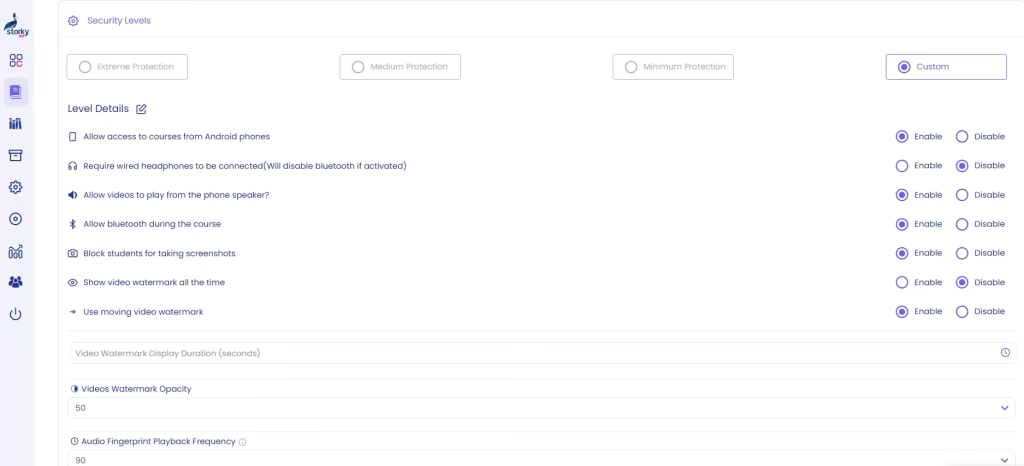
Storky App provides a robust four-level security system tailored for professional online teaching, giving instructors control over how strictly their content is protected. The four levels—Custom, Low, Medium, and Strict—differ in the transparency of the watermark and the clarity of the audio fingerprint:
- Invite-Only Access: Students can join only through a direct invitation via phone or email, ensuring controlled enrollment at every protection level.
- Screenshot & Screen Recording Protection: Attempts to capture the screen are blocked automatically. The stricter the level, the more aggressive the protection, with account suspension until the instructor restores access.
- Single-Device Restriction: Limits students to one device. Higher levels enforce stricter device control to prevent sharing or unauthorized access.
- Emulator & External Display Blocking: Blocks access via emulators or external screens to prevent content duplication, with more advanced enforcement at Medium and Strict levels.
Each level balances security and user experience, with watermarks becoming more visible and audio fingerprints clearer as you move from Custom to Strict, ensuring your content remains fully protected without disrupting the learning process.
When protecting your content is a priority, not every platform gives you the control you need. Storky App doesn’t just keep your course videos safe from leaks—it brings all your tools into one place. From managing students and organizing courses to controlling access and safeguarding your content, everything is designed to let you focus on teaching and growing your students—without worrying about illegal copies.
StorkyApp = Security + Professionalism + Peace of Mind.
FAQ
1- Can I protect my videos on free platforms like YouTube or Google Drive?
Not fully. Free platforms lack proper access control, screen protection, and monitoring tools.
2- Will these security protections disturb or inconvenience students?
No. The instructor has full control over the level of protection applied. They can choose the security settings that best fit their course and students, creating the right balance between strong protection and a smooth learning experience.
3- Are paid platforms expensive?
Paid platforms have a cost, but the real expense is leaving your content unprotected — in lost revenue, reputation, and time.